
Well hello there, I was just surfing on forum this morning about Claude code and I found many people are suffering about this Claude code tokens and limits especially if you are Pro subscriber, it burns fast and hits the limit quick.
Even worse if you activate superpower plugins on a large codebase, I know combination Claude code + Superpower kind of OP (overpowered) and costs you a lot, and I experienced the same.
So I did some research to reduce token usage, and I found some articles and YouTube videos mentioning about graphs and vectors in obsidian, where you can link Markdown files easily, make connection and turn them into a graph.
So, why does this matter? Of course its matter, imagine instead of working on obsidian and Markdown why don’t you apply that same idea to your codebase, if we can do that it gives Claude code the relevant context with minimum spawn explore agent.
If Claude has context this AI will become smarter, right? And what if there some tools out there can make this connection, parsing your code make connection or link between function, class, method, and relationship.
The answer is yes there is such a tool like that, And I’m very happy to share with you guys. The Tools that I’m talking about is Code Graph.
What is Code Graph
Code Graph is a tools for pre indexing symbol relationship, function, object, class, and code structure instead scanning larger files manually using an explore agent. What does mean?
So imagine Claude code has a map, that mapping all entire codebase, indexing the address into local database, when Claude need something, it invokes Code Graph tools and gets the context directly.
In return it’s faster and cheaper compared to traditional because it doesn’t need to do explore files 1 by 1 and if Claude doesn’t found what it needs, it spawns the explore agent.
Project Source: Code Graph in github
How it Works
- Indexing Codebase. Mapping and convert your codebase using tree-sitter parsing result in Concrete Syntax Tree (CST), save the format into local machine with vector embeddings.
- Claude Code connect via MCP. When Claude need context he will invoke the query graph and understand your code, instead reading and exploring.
- Get Full Context. it will gets everything from our index, entry points code snippet, related symbol.
- Update Index. After finish the things it will updates and sync the index. So make sure the index keep fresh and updated.
Usage & Benchmark
To use this tools its actually very easy. You just run single command to get up and running. And then you just make indexing for first time. Everything will works seamlessly.
# init setup automatically
npx @colbymchenry/codegraph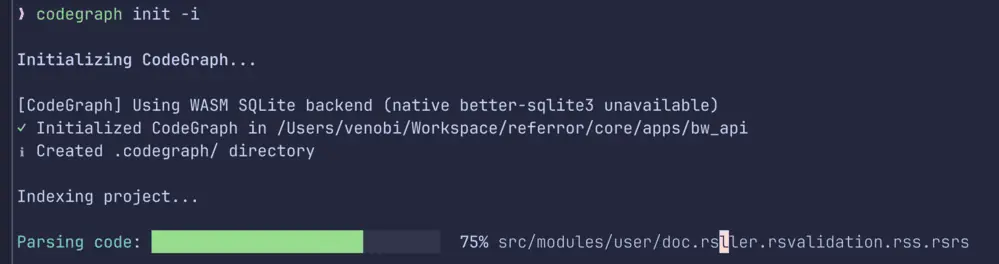
Indexing Code Graph Process
Troubleshoot
Issue when you don’t have sqlite driver on your local
❯ codegraph init -i
Initializing CodeGraph...
[CodeGraph] Using WASM SQLite backend (native better-sqlite3 unavailable)
Solution:
# Install better sqlite 3 globally on machine
npm install -g  better-sqlite3
Pro Tips: In the setup its already given instruction on how to use the tools to claude code, but sometimes it doesn’t call automatically, you have to mention like before explore the files plase use code graph
Here are the app code base that I ran on my machine, before and after use code graph
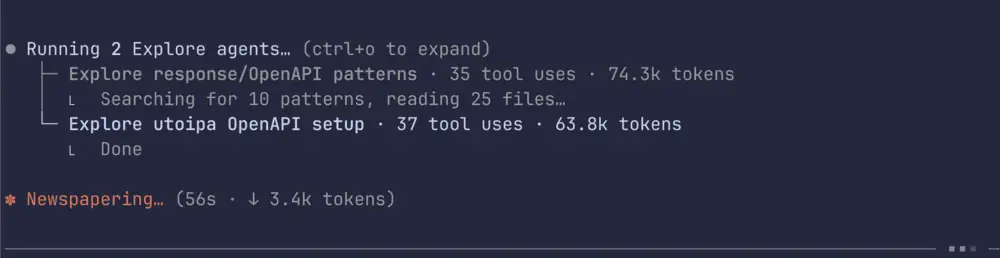
Before Use Code Graph
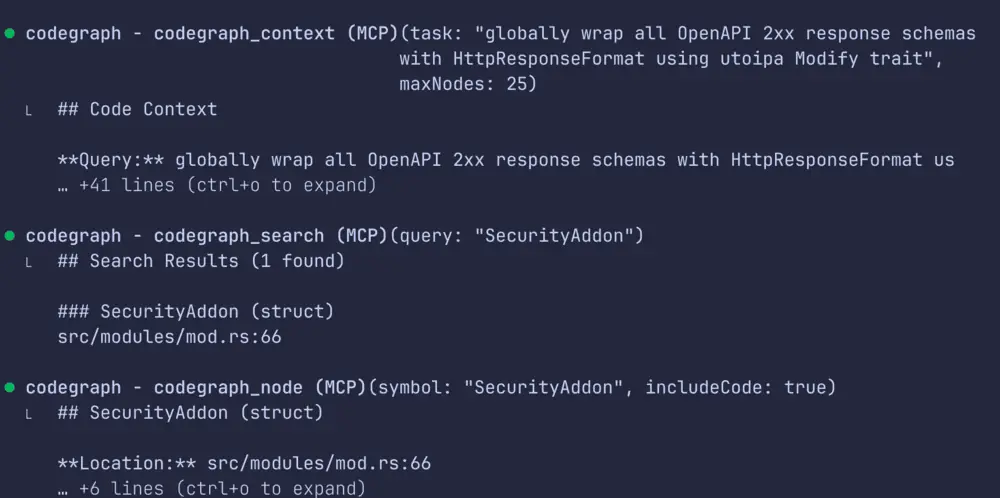
After Use Code Graph
Comparison CodeGraph Usage:
| Metric | Without CodeGraph | With CodeGraph | Improvement |
|---|---|---|---|
| Explore tokens | 157.8k | 111.7k | 29% fewer |
| Per-agent tokens | 74.0k | 46.4k | 37% fewer |
| Tool calls | 60 | 45 | 25% fewer |
| Main context usage | 28.7% | 24.0% | 4.7% less |
Conclusion
From my short experience, it’s very smooth. Everything easy to integrate and code graph works like I said, and I feel it reduce the context token compared to without using this tools. And worth to try.
I’ve only test this tools for about a day. So, I don’t have much test scenario yet this time but if you guys interesting with this tool, I will create another post to discuss this tools deeper.
Hope this post can help you to reduce Claude costs, that burning faster every time Claude code spawn exploration agent.